by RMLS Communication Department | Jun 14, 2010
Down slightly in Washington, but up slightly in Oregon
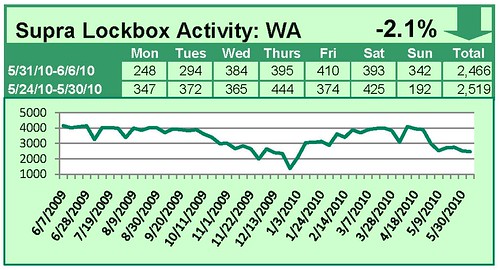
When comparing the week of May 31 – June 6 with the week prior, the number of times an RMLS™ subscriber opened a Supra lockbox decreased 2.1% in Washington and increased 2.2% in Oregon.

Click the chart for a larger view
Archive
View an archive of the Supra lockbox statistical reports on Flickr.
![New RMLSweb Feature: Links Available for City and County Names]()
by RMLS Communication Department | Jun 9, 2010
Learn more about an area by clicking the links!
Recently, RMLSweb was updated with several new features. One of these features is the ability to view a city or county’s Web page by one simple click of the mouse. In client and agent reports, most city and county names are now links to local Web sites of municipalities for that area.
This can be useful if you have a client who currently lives in Ashland, Oregon, but is interested in buying a home in Portland, Oregon. After performing searches to find an appropriate listing that meets your client’s needs, you can email them a client report and they have the ability to also view the city or county’s Web page for more information.
By looking at the city or county’s Web page, your client can decide if that particular area would be a good fit for their needs. This new feature can also be used by agents who would like to learn more about a particular area in order to educate potential clients.
Take a look at the image below. This listing has links for both the city (Portland) and the county (Multnomah). These links will take the viewer to the official Web site for the city of Portland and to the Multnomah County home page.

How else have you used this new link feature?

by RMLS Communication Department | Jun 7, 2010
Activity takes a downward turn in Washington and Oregon
When comparing the week of May 24 – May 30 with the week prior, the number of times an RMLS™ subscriber opened a Supra lockbox decreased 8.4% in Washington and decreased 8.8% in Oregon.


Click the chart for a larger view
Archive
View an archive of the Supra lockbox statistical reports on Flickr.

by RMLS Communication Department | Jun 3, 2010
The new, improved CMA report has arrived
 The transformed RMLSweb CMA (Comparative Market Analysis) has a brand new look and feel, as well as a new location! In addition to an extensive remodel of CMA, RMLSweb also now contains a Radius Search and enhanced User Preferences. Creating a CMA has never been easier and yet offered so many customizable options to set your CMA apart from the rest!
Highlights of the CMA include:
1) Navigate forwards and backwards without losing data
2) Adding comparables via seven different methods (MLS Numbers, Radius Search, Map Search, Address Search, Advanced Search, MLS Number Search, Saved MLS Numbers)
3) Saving the CMA in progress
4) Printing to PDF, printing to your printer, or e-mail with the touch of a button
5) Reorder your comparables or the pages of your CMA report by dragging and dropping them into the order you desire
6) Incorporate properties that are in different categories (ex: Farms/Ranches + Lots/Lands)
7) Display your recommended price through a graph
8) Customize your report with pages dedicated to Company Information, your Resume, and/or color themes to match your office/team
9) Auto-populate subject property information with Tax ID or previous MLS #
For more information, print out our quick reference guide.
Want a trainer to come out to your office and demonstrate this enhanced functionality? Call our Training Manager, Kerry Meeuwsen at 503-872-8051 or e-mail kerry.m@rmls.com.
by RMLS Communication Department | Jun 1, 2010
The new, improved CMA report arrives soon
The transformed RMLSweb CMA (Comparative Market Analysis) will have a brand new look and feel, as well as a new location! In addition to an extensive remodel of CMA, RMLSweb will also contain a Radius Search and enhanced User Preferences. Creating a CMA has never been easier and yet offered so many customizable options to set your CMA apart from the rest!
Highlights of the CMA include:
1) Navigate forwards and backwards without losing data
2) Adding comparables via seven different methods (MLS Numbers, Radius Search, Map Search, Address Search, Advanced Search, MLS Number Search, Saved MLS Numbers)
3) Saving the CMA in progress
4) Printing to PDF, printing to your printer, or e-mail with the touch of a button
5) Reorder your comparables or the pages of your CMA report by dragging and dropping them into the order you desire
6) Incorporate properties that are in different categories (ex: Farms/Ranches + Lots/Lands)
7) Display your recommended price through a graph
8) Customize your report with pages dedicated to Company Information, your Resume, and/or color themes to match your office/team
To schedule a preview of the new CMA, contact Kerry Meeuwsen, the RMLS™ Training Manager, at (503) 872-8051 or kerry.m@rmls.com.